Project 02
Research-to-Content Automation
An end-to-end AI automation system that turns new research publications into publish-ready social copy, insights, and brand-consistent Canva assets, delivered to the marketing team via Slack.
AI Workflow Design
Product · Systems
Role
System & Product Design (workflow architecture, interfaces)
Timeline
8 weeks
team
Me, Product manager, Product Owner, 2 Engineers, Content Developers
platform
Web
Tools
Make.com, Slack, Canva, ChatGPT, Claude, Figma
Client
Harvard Business School AI Institute (formerly D³ - Digital Data Design Institute)

Overview
I designed an end-to-end AI automation system that eliminated manual research monitoring delivering publish-ready social copy, AI insights, and brand-consistent Canva assets directly to the marketing team via Slack, at the Harvard Business School AI Institute (formerly the Digital Data Design Institute, D³).
The Problem
At the Institute, faculty and researchers regularly publish high-impact work — but the marketing team had no automated way to know when new research went live. Every post started from scratch: someone had to manually find the paper, read it, extract key insights, write platform-specific copy, brief a designer, and create assets before anything could be published. The result was inconsistent coverage, missed publications, and a team spending 3–5 hours per week on a process that should have taken minutes. High-impact research regularly went unnoticed on social channels simply because the pipeline was broken.

Problem breakdown: Three failure points: no detection system, hours of manual work per post, and inconsistent coverage that let research go unseen.
My Approach
I mapped the existing workflow end to end, every step, handoff, and point of friction. The problem wasn't effort or skill; the team was talented but working inside a broken system with no automation, standardization, or visibility. So I designed the system first and built it second: I defined the ideal workflow from research detection to published post, identified which steps could be automated, which required human judgment, and where AI could genuinely add value rather than just complexity.

Designed the system architecture and human-review points before selecting any tools; built the automation in Make.com and the interfaces in Figma.
System Architecture
The system connects six stages, each feeding directly into the next, with human review built in at exactly the right moment. The marketing team stays in control of creative decisions while the system handles everything that doesn't require human judgment.
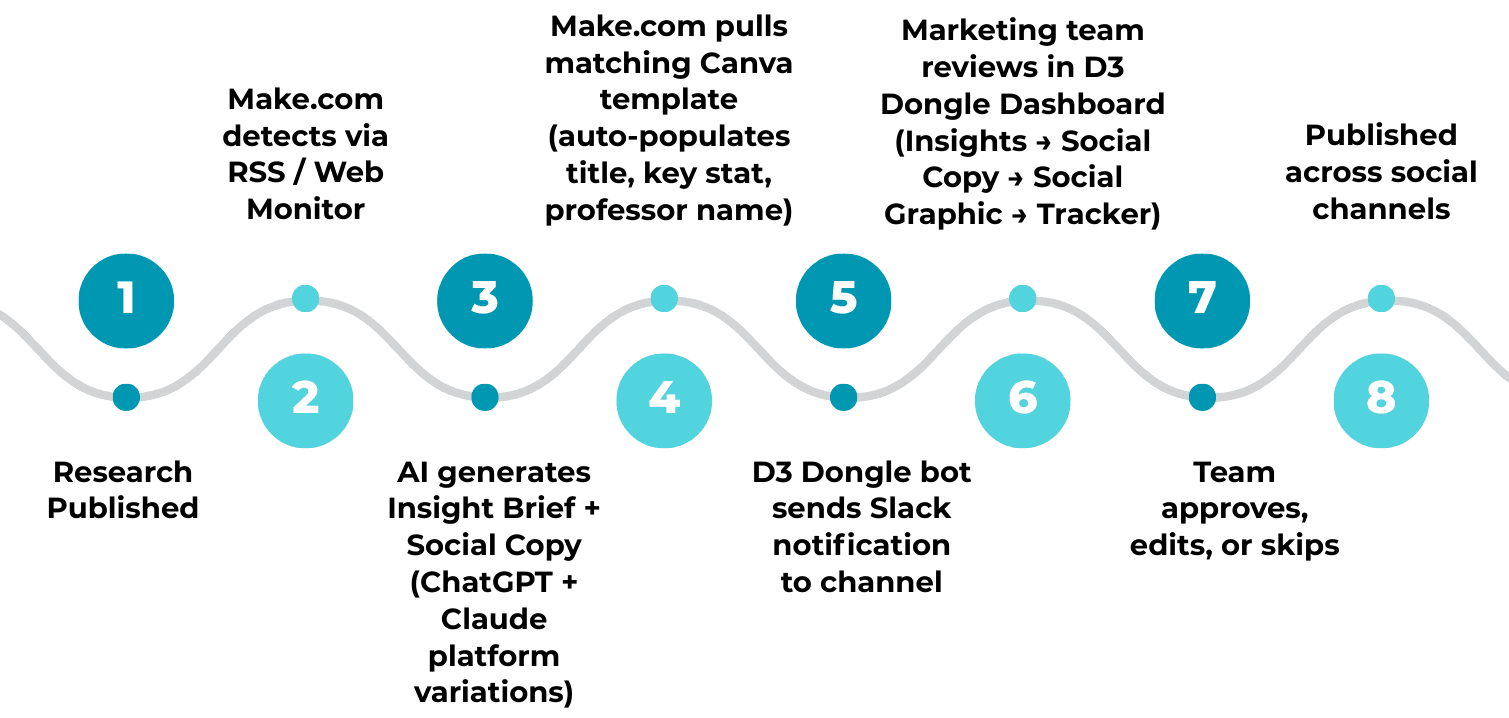
Pipeline Diagram
The Interfaces
Each screen was designed around a specific job-to-be-done — from instant awareness to deep review to pipeline oversight. Together they form a complete system that requires zero new behavior from the team.
Entry Point
The moment Make.com detects a new publication, the "D³ Dongle" bot fires a structured alert into the #Research_Corner Slack channel — professor name, paper title, key insight, three social-copy links, and a direct Canva template link, all in one message. The team can approve, edit, or skip without leaving Slack.
Design decision: Slack is where the marketing team already lives, so making it the primary entry point meant zero onboarding, zero friction, and immediate adoption from day one.

The entry point: a structured research alert in Slack with insight, platform copy, and a ready Canva template approve or edit in place.
Insight Brief
For publications needing careful review, the team opens the D³ Dongle dashboard. The Insights page surfaces the full AI-generated brief :paper title, key findings, suggested content angle, recommended Canva template, and all three platform copy variations in one scrollable view, with sub-pages for Insights, Social Copy, Social Graphic, and Documents.
Design decision:
I structured the brief to mirror how a creative director would brief a team, not just raw AI output. The content angle and audience note push the marketer toward strategic decisions rather than reactive posting.

The research brief: key findings, a suggested content angle, a recommended template, and per-platform copy; organized like a creative-director briefing.
Social Copy + Canva Preview
The Social page shows AI-generated LinkedIn copy alongside the pre-loaded Canva template preview in a split view character count, suggested hashtags, Edit Copy, and Approve & Schedule. The Canva template auto-populates the research title, key stat, and professor name, ready to open and customize in one click.
Design decision: Placing copy and visual in the same view lets the marketer check tone, message, and design alignment at once catching inconsistencies before they reach the audience, not after.

Social Copy + Canva split view: Copy and visual side by side, so tone and design are reviewed together in one screen.
Tracker Dashboard
The Tracker gives team leads a full pipeline view across every research publication; author, title, date, channel, and status (In Progress / Complete / Pending / Approved / Rejected) all in one place. Coverage gaps are immediately visible, and the lead can see exactly where every piece of content stands without chasing anyone.
Design decision: This screen was built specifically for the team lead, to make the entire content operation visible at a glance shifting the team from reactive firefighting to proactive pipeline management.

Tracker dashboard: A pipeline view for team leads every publication's status in one table, so nothing falls through the cracks.
Impact
From 3–5 hours to under 30 minutes per publication
~80% reduction in time from research publication to publish-ready content brief
100% of publications now detected automatically zero manual monitoring
3x more research publications covered consistently across social channels
0 new tools the marketing team had to learn the entire workflow is delivered via Slack
Beyond the time savings, the system changed how the team operates: coverage became consistent and proactive rather than reactive, and the team shifted from low-value mechanical tasks to creative refinement, strategic decisions, and audience engagement the work that actually requires human judgment.
Reflection
The most important design work happened before I opened Figma mapping the existing workflow, identifying the right automation touchpoints, and deciding where human judgment should be preserved determined whether the system would work in practice. I also learned that the best automation is invisible to the people using it: the team didn't need to understand Make.com or AI APIs they needed a Slack message that made their job easier, and designing for that simplicity required more complexity under the hood, not less.
What worked well:
Keeping Slack as the single entry point dramatically reduced adoption friction the team started using the system immediately because it required zero behavior change.
What I'm working on next:
A direct scheduling integration from the Tracker to social platforms (so approved content publishes without the final manual step), plus an analytics feedback loop pulling post-engagement data back into the Insights brief to learn which content angles and templates drive the highest engagement.